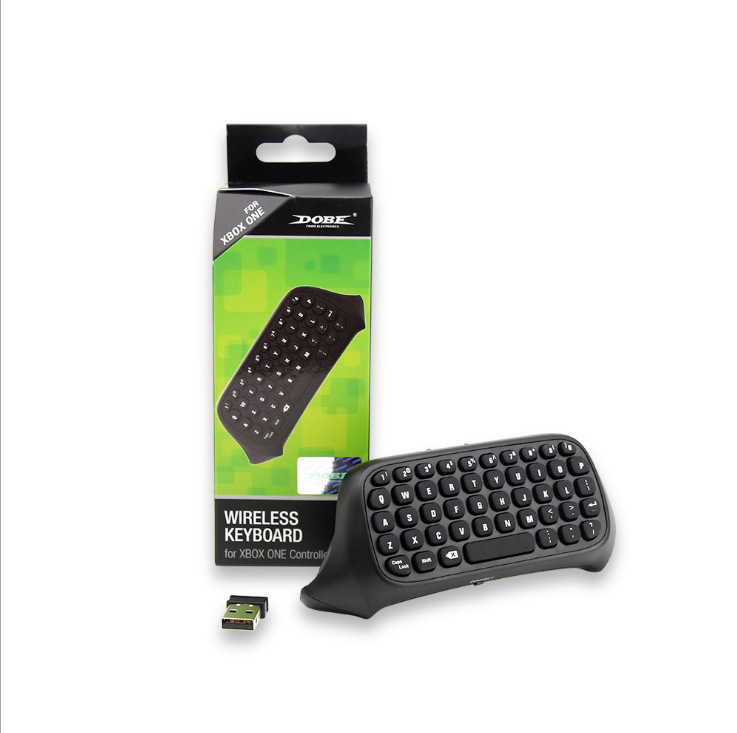
ONE Handle Keyboard 2.4g Wireless Xboxone Chat
$9,39
Instructions for use: 1. Connect the XBOX one host power supply first, then connect the HDMI cable to the display device and turn on the XBOX one host power supply. The corresponding power indicator lights up. 2. Connect the Xbox_one handle
TAJO önerisi: Neden bu ürün?
Bu ürün için doğrulanmış bir TAJO önerisi bulunmadığından gerekçe teyit edilemiyor.
Önemli bir sınırlama
Bu ürün için doğrulanmış bir sınırlama bilgisi yok; bu nedenle teyit edemiyoruz.
Fiyatlar USD olarak gösterilir · Nihai fiyat ve stok ödeme adımında doğrulanır.
Ürün detayları
Instructions for use: 1. Connect the XBOX one host power supply first, then connect the HDMI cable to the display device and turn on the XBOX one host power supply. The corresponding power indicator lights up. 2. Connect the Xbox_one handle to the XBOX one host (do not understand the manual) 3. Align the two connecting posts of the keyboard with the holes of the controller, align the XBOX ONE headphone head with the seat on the back of the wireless controller, and then gently push the keyboard to the controller until it is stuck. . 4. When the controller of the controller is connected, press the code button on the back of the XBOX one keyboard. The blue light of the XBOX one keyboard will be bright. At this point, the 2.4G receiver of the distribution is plugged into any USB port of the XBOX one host, and the XBOX one keyboard can be automatically completed. 5. After the code is completed, the XBOX one blue code light will be off, which means that the XBOX one keyboard can work normally. (If there is no code success, the blue pair of lights will turn off automatically for 12 seconds, indicating that the XBOX one keyboard enters the sleep power saving mode) 6. The XBOX one keyboard and the 2.4G receiver only need to be coded once, and the subsequent use only needs to open the host wake-up handle to be automatically connected and used directly. 7, XBOX one handle sleep, this product will also go to sleep. Press the “” button on the XBOX one handle to wake up the handle and keyboard.
Müşteri Değerlendirmeleri
Henüz müşteri değerlendirmesi bulunmuyor.
Değerlendirme yazın
Puan, yorum ve isteğe bağlı görseller.
Değerlendirme gönderimi henüz açık değil. Alıcı doğrulaması ve gönderim hizmeti hazır olduğunda etkinleşecek.
Bu AI önerisi faydalı mıydı?
Bu ürün için etkin bir TAJO önerisi bulunmuyor. Geri bildirim gönderimi henüz kullanılamıyor; hiçbir şey gönderilmez.
Kargo ve iade
Kargo ücreti ve teslim süresi bu sayfada doğrulanmadı; ödeme adımında kesinleşir. Ücretsiz kargo veya kesin teslim tarihi vaat edilmez.
İade koşulları sipariş ve tedarikçiye göre değişebilir; satın almadan önce ödeme adımındaki bilgileri kontrol edin.